
From Beginner Settings to Pro-Level Sonar Tuning (Including the False Bottom Method)
Whether you’re fishing the Great South Bay, Fire Island Reef, offshore wrecks, or deep ledges, a properly tuned fishfinder is one of the most powerful tools on your boat.
The reality is this:
Most sonar units are capable of incredible performance — but factory auto settings hide detail, suppress bait, and make bottom interpretation harder than it should be.
This is the complete, professional guide to tuning your fishfinder so you can:
-
See fish tight to the bottom
-
Identify bait vs clutter
-
Read hard vs soft bottom
-
Maximize depth penetration
-
Dial in your sonar like a pro captain
Part 1: How Fishfinder Sonar Actually Works (Quick but Important)
Your transducer sends sound waves (pings) into the water column.
When those sound waves hit:
-
Fish
-
Bait schools
-
Structure
-
The seabed
They bounce back to the transducer and are translated into the image on your display.
Key rule:
-
Strong return = dense object (rock, wreck, hard bottom)
-
Weak return = soft bottom, small bait, or silt
Part 2: The Most Important Setting — Gain (Sensitivity)
Gain controls how much sonar signal your unit listens for.
Proper Gain = Maximum Information
Low Gain:
-
Clean screen
-
Missed fish
-
Weak bottom detail
High Gain:
-
More bait and fish visible
-
Stronger bottom returns
-
Potential clutter if overdone
Auto gain is conservative. It is designed to make the screen look clean, not to show maximum detail. Serious anglers should learn to tune gain manually.
Part 3: The False Bottom Method (The Gold Standard for Sonar Tuning)
This is one of the most accurate and repeatable ways to tune your sonar for real fishing performance.
A false bottom (double bottom) is a faint second echo that appears below the real seabed when your sonar gain is properly optimized and the signal is penetrating strongly.
Part 4: Step-by-Step False Bottom Tuning Method (FULL PROFESSIONAL VERSION)
Step 1: Choose a Stable Bottom Area
Start in an area with a consistent bottom:
-
Sand flats
-
Mud bottom
-
Open bay channel
-
Not directly over heavy structure or thick bait
This gives you a clean reference signal.
Step 2: Switch Your Sonar to Manual Mode
Turn OFF full auto and manually control:
-
Gain / Sensitivity
-
Depth Range
-
Noise Rejection (set low initially)
-
TVG (low to moderate)
Auto mode often prevents a false bottom from appearing.
Step 3: Set Your Depth Range to at Least 2× the Actual Water Depth (CRITICAL STEP)
This is one of the most overlooked but essential steps.
Set your sonar display range to show at least double the real depth.
Real-World Examples:
-
Fishing in 25 ft → Set range to 50–60 ft
-
Fishing in 40 ft → Set range to 80–100 ft
-
Fishing in 75 ft → Set range to 150 ft
Why this matters:
The false bottom appears below the real seabed.
If your range is too tight, the second echo will be off-screen and you will never see it — even if your gain is perfect.
Step 4: Slowly Increase Gain Until the False Bottom Appears
Now begin raising sensitivity gradually.
Watch the bottom return closely:
-
Bottom line becomes thicker
-
Colors intensify (red/orange/yellow on most palettes)
-
Detail improves
Eventually, a faint second bottom line will appear below the real bottom.
That is the false bottom (double bottom).
Step 5: Reduce Gain Slightly (Lock In Optimal Sensitivity)
Once the double bottom is clearly visible:
-
Lower gain just enough so the false bottom fades or barely disappears
-
Keep the main bottom bold and well defined
This is your optimal tuning zone:
-
Maximum fish visibility
-
Strong bottom clarity
-
Minimal clutter
-
Best target separation
Part 5: What the False Bottom Tells You About Bottom Hardness
A strong false bottom is not just a tuning tool — it is also a bottom composition indicator.
Strong, Clear False Bottom:
-
Hard bottom
-
Rock
-
Wrecks
-
Shell beds
-
Reef structure
Weak or No False Bottom:
-
Mud
-
Sand
-
Silt
-
Absorptive soft bottom
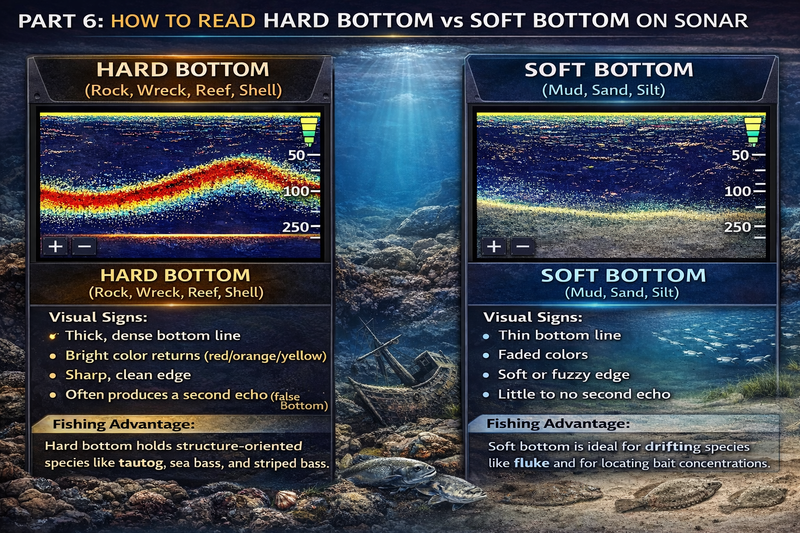
Part 6: How to Read Hard Bottom vs Soft Bottom on Sonar
Hard Bottom (Rock, Wreck, Reef, Shell)
Visual Signs:
-
Thick, dense bottom line
-
Bright color returns (red/orange/yellow)
-
Sharp, clean edge
-
Often produces a second echo (false bottom)
Fishing Advantage:
Hard bottom holds structure-oriented species like tautog, sea bass, and striped bass.
Soft Bottom (Mud, Sand, Silt)
Visual Signs:
-
Thin bottom line
-
Faded colors
-
Soft or fuzzy edge
-
Little to no second echo
Fishing Advantage:
Soft bottom is ideal for drifting species like fluke and for locating bait concentrations.
Part 7: Frequency Selection (CHIRP, High, Medium, Low)
High CHIRP / High Frequency (150–240 kHz)
Best for:
-
Shallow water
-
Bait schools
-
Fish separation
-
Detail
Medium CHIRP (80–160 kHz)
Best all-around setting for:
-
30–300 ft depths
-
Mixed structure
-
General fishing
Low CHIRP / Low Frequency (40–80 kHz)
Best for:
-
Deep water
-
Offshore fishing
-
Maximum bottom penetration
-
Strong false bottom visibility
Part 8: Key Advanced Settings (Pro-Level Adjustments)
Noise Rejection / Interference
Recommended:
-
Low to Medium for most fishing
-
High only if electrical interference exists
Too much filtering hides real fish targets.
TVG (Time Variable Gain)
Controls surface clutter suppression.
Recommended:
-
Shallow water: Low TVG
-
Deep water: Medium TVG
Too high = lost mid-column fish and bait.
Scroll Speed / Chart Speed
Match scroll speed to boat speed:
-
Drifting: Slow–Medium
-
Trolling: Medium
-
Running/scouting: Fast
Improper scroll speed distorts fish arches and structure clarity.
Part 9: Tuning for Different Fishing Environments (Real-World)
Great South Bay / Shallow Water (10–30 ft)
-
High CHIRP
-
Moderate gain
-
Low TVG
-
Faster scroll speed
Goal: Separate bait from bottom clutter.
Reef & Wreck Fishing (Fire Island Reef, Artificial Reefs)
-
Medium CHIRP
-
Higher gain (use false bottom method)
-
Manual depth range (2× depth)
Goal: See fish tight to structure and bottom transitions.
Offshore & Canyon Fishing (100–1000+ ft)
-
Low CHIRP or dual frequency
-
Higher gain
-
Medium TVG
-
Slower scroll speed
Goal: Maximum depth penetration and bait detection.
Part 10: Transducer Setup (Often More Important Than Settings)
Even perfect tuning cannot fix poor installation.
Critical factors:
-
Correct transducer angle (parallel to waterline)
-
Clean water flow (no turbulence)
-
Proper mounting location
-
No aerated water at speed
Poor placement = weak returns, clutter, and lost bottom tracking.
Part 11: The Most Common Sonar Tuning Mistakes (That Cost Anglers Fish)
-
Leaving sonar on full auto all season
-
Running gain too low for a “pretty” screen
-
Overusing noise filters
-
Not adjusting depth range
-
Ignoring the 2× depth rule
-
Never retuning when moving from bay to ocean
-
Using wrong frequency for depth
Final Takeaway: What Perfectly Tuned Sonar Looks Like
You know your fishfinder is dialed in when:
-
Bottom is thick and clearly defined
-
Minimal clutter on screen
-
Bait shows as distinct clouds
-
Fish arches are visible (not faint streaks)
-
False bottom appears at high gain
-
You can clearly distinguish hard vs soft bottom
When tuned correctly, your fishfinder stops being just a depth gauge and becomes a true underwater scouting system — showing structure, life, and bottom composition with professional-level clarity.
And for serious boaters and anglers, especially in mixed environments like Long Island waters, that tuning difference can easily be the difference between running over fish… and actually seeing them.